

Mobile ordering at Universal Orlando Resort has been around since 2018, but it’s become an even bigger part of the theme park experience in recent years. With just a few taps on your phone, you can skip the line and grab your meal from locations across Universal Studios Florida, Islands of Adventure, Epic Universe, Volcano Bay, and CityWalk.
To help you make the most of your visit (and avoid those long food lines), we’ve broken down everything you need to know about how mobile ordering works across the resort. Let’s dig in!
Skip to: Mobile ordering overview | Which locations offer mobile ordering? | FAQ
What is mobile ordering?
Mobile ordering allows guests to use their mobile phones to order ahead at select Universal restaurants. In doing so, you can avoid waiting in the long lines that sometimes plague the most popular quick-service locations in the parks. The process is quick, easy, and all done through the official Universal Orlando Resort mobile app.
Placing a mobile order
The first thing you’ll need if you want to place a mobile order is a Universal Orlando account. Once you’ve logged in on the app, you can set up a digital wallet and link a credit card, allowing you to easily and quickly pay for any orders you place. (Don’t worry – there’s no extra charge for placing a mobile order rather than doing so in person.)
Once you’ve set up your wallet, you can tap “Dining” on the home screen or “Mobile Food & Drink Ordering” in the side navigation menu. Here, you’ll be able to browse the different available restaurants and their menus. When you’re ready, choose your pickup time—this is especially handy if you’re waiting in line and planning to eat right after your next ride. Then, select your entrées, drinks, and snacks, and customize each item with your preferred sides, toppings, and options. You can also modify the number of items (in other words, we encourage you to order as many doughnuts from Voodoo Doughnut as your heart desires!).
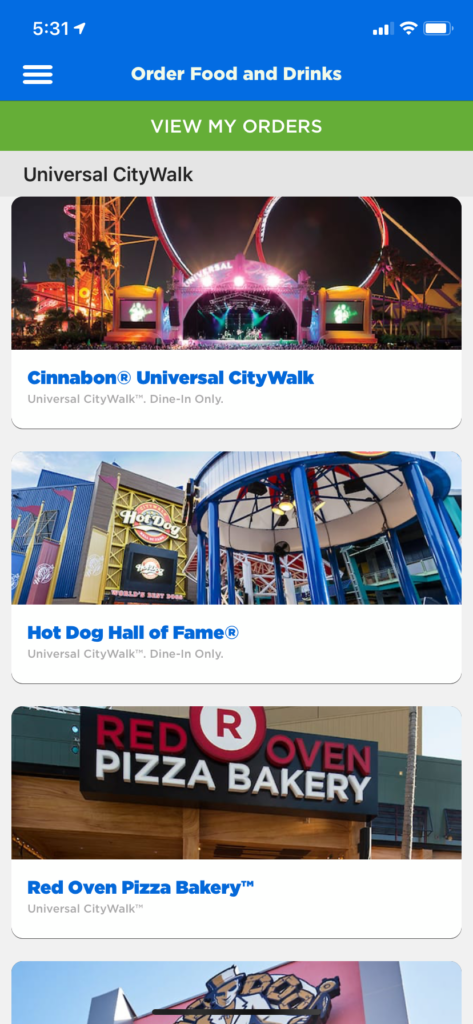
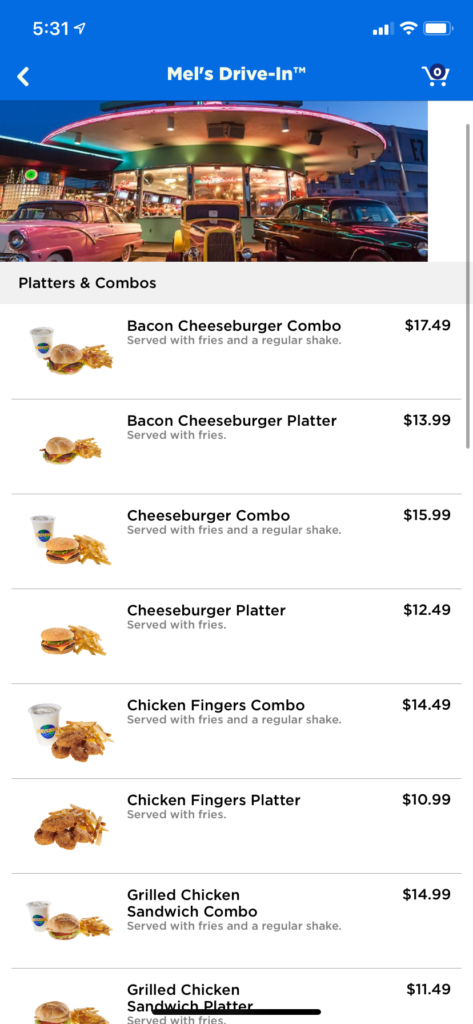
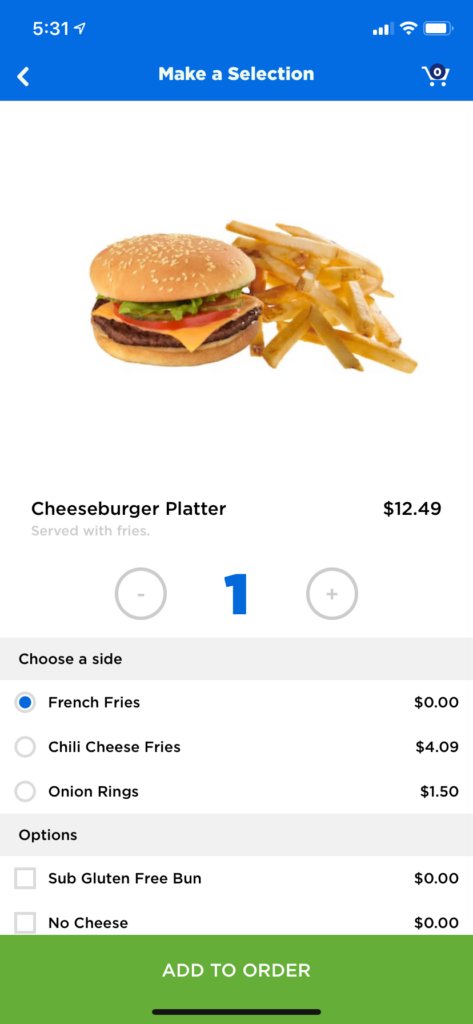
After you check out, a confirmation screen will pop up. Once you’re within your selected pickup window, you’ll see a button that says “Prepare My Food.” Be sure to wait until you’re at—or at least near—the restaurant before tapping it. This ensures your food is made fresh and isn’t sitting out too long. When your order is ready, you can pick it up either at a designated pickup window or by taking a seat at specially marked tables, depending on the restaurant’s setup.
Which locations offer mobile ordering?
Currently, more than 25 restaurants all around Universal Orlando Resort offer mobile ordering.
Universal Studios Florida – locations with mobile ordering
- New York
- San Francisco
- The Wizarding World of Harry Potter – Diagon Alley
- Springfield: Home of the Simpsons
- Simpsons Fast Food Boulevard
- Luigi’s Pizza
- The Frying Dutchman
- Flaming Moe’s
- Cletus’ Chicken Shack
- Krusty Burger
- Simpsons Fast Food Boulevard
- Hollywood
- Illumination’s Minion Land
Islands of Adventure – locations with mobile ordering
- Port of Entry
- Marvel Super Hero Island
- Toon Lagoon
- Jurassic Park
- The Wizarding World of Harry Potter – Hogsmeade
- The Lost Continent
- Seuss Landing
Epic Universe – locations with mobile ordering
- Celestial Park
- Dark Universe
- How to Train Your Dragon – Isle of Berk
- SUPER NINTENDO WORLD
- The Wizarding World of Harry Potter – Ministry of Magic
Volcano Bay – locations with mobile ordering
- Wave Village
- River Village
- Rainforest Village
CityWalk – locations with mobile ordering
- Bend the Bao
- Bob Marley – A Tribute to Freedom
- Bread Box Handcrafted Sandwiches
- Hot Dog Hall of Fame
- Red Oven Pizza Bakery
- Voodoo Doughnut
Mobile ordering at Universal Orlando – frequently asked questions
Does it cost more to place a mobile order?
No, there’s no upcharge for ordering on your phone as opposed to doing so in person.
Do mobile orders have a pick-up time?
Yes! When placing your order, you’ll choose from the available pickup time frames that work best for your schedule. Once you’re within that window, the “Prepare My Order” button will appear—just tap it when you’re ready for the kitchen to get started. Turnaround time is often quick, so it’s best to wait until you’re at (or very close to) the restaurant before hitting that button. After that, keep an eye on your phone. You’ll get a notification as soon as your food is ready.
Can I place a mobile order from outside the park?
No, you must be inside the correct park (or inside CityWalk) to place an order; for example, you can’t order from Mel’s Drive-In if you’re over at Volcano Bay.
Can I use my annual pass discount, Universal Dining Plan, or Universal Orlando gift card on a mobile order?
Yes, you can use your annual pass discount while mobile ordering. The process is exactly the same, except right before you check out, you tap the “Apply Passholder Discount” button. The app will allow you to scan the barcode on your pass, or you can manually enter your passholder ID instead. Once you’ve done so, the discount will be reflected in your order.
Unfortunately, mobile ordering does not currently support Universal Orlando gift cards. These are the only ways you might lose out on some money by not going the traditional route.
Will the Universal Orlando Resort app work with my phone?
That depends on the type of smartphone you have and how recently it was released. The app is compatible with iPhone, iPad, and iPod touch for Apple users – so if you have one of those devices, you’re probably in good shape. However, it requires iOS 14.1 or later in order to run; this operating system is compatible with iPhone 6S and later, all iPad Air and iPad Pro models, iPad 5th and 6th generation, iPad mini 2 and later, and iPod touch 7th generation models. For Android users, you’ll need a phone that can run Lollipop (also known as Android 5.0) or any more recent operating system.
In general, if your phone was released in 2015 or later, you should be able to run the app – but this can vary depending on the type of Android you own.
- Breakfast Options at Universal Orlando Resort
- Character Meet and Greets at Universal Orlando – Complete Guide
- Child Swap at Universal Orlando’s Thrill Rides
- Free or Inexpensive Things to Do Around Orlando
- Grocery Delivery Guide: Universal Orlando & Walt Disney World
- Internet Access at Universal Orlando – Complete Guide
- Lockers at Universal Orlando – a Complete, Up-to-Date Guide
- Men in Black Alien Attack – How to Max Out Your Score at 999,999
- Mobile Ordering at Universal Orlando – Complete Insider’s Guide
- My Universal Photos & ride photos at Universal Orlando – complete guide
- Phone Charging at Universal Orlando – complete guide
- Refillable Cups, Popcorn Buckets, and Coke Freestyle at Universal Orlando – Complete Insider’s Guide
- Shopping and Merchandise at Universal Orlando – Complete, Up-to-Date Guide
- Single-riders’ Lines at Universal Orlando – Complete Insider’s Guide
- Ultimate Seating Guide to ALL Universal Orlando Resort Rides
- VIP Tour Experience at Universal Orlando Resort
- Virtual Lines at Universal Orlando – complete insider’s guide
- Visiting Universal Epic Universe with kids – a complete, up-to-date guide
- Visiting Universal Islands of Adventure with kids – a complete, up-to-date guide
- Visiting Universal Studios Florida with kids – a complete, up-to-date guide
- Visiting Volcano Bay with Kids – A Complete, Up-to-Date Guide
- Ultimate Adult’s Guide to Universal Orlando Resort